Product and interaction design case studyOctober 2026
01 · The design challenge
A command station you can carry
When you fly a small group of drones, the drones are the easy part to carry. Everything that lets one person supervise them safely is not. There are screens to see the flock, a radio and antenna for each drone, beacons so the drones know where they are indoors, batteries, chargers, a computer and the power to run it all. On a workbench that kit spreads across a table and a tangle of cables. Out in the world it has to travel with the operator and work wherever they arrive.
So the idea became a case. Picture the operator walking into a room they have never seen, carrying everything in one hand. They set the case down, open the lid, place a few beacons on the walls, and within minutes the case tells them whether the room is ready. From then on the case is their command station, the screen they glance at, the controls under their hands and the stop they can find without looking.
The case journey
CarryOne person, one hand, through doors and up stairs. Nothing left behind because everything has a place.
ArriveA room they have never seen, with its own furniture, walls and people. No time to study it.
Open and set upLid up, beacons out, power on. The case guides the steps and checks the room.
Ready to flyA clear go or no go, then a command station that stays calm until it needs them.
We weren't really designing a box of electronics. We were designing a way for one person to arrive anywhere, be ready quickly and stay oriented while several autonomous machines make decisions around them.
Part 1, what this article covers
This is the first part of an ongoing case study, and it focuses on the case itself. It covers our research, our initial exploration of what the case needs to do, the concepts we sketched and how the design team evaluated them. The on screen interface is part of that story, because the screen is one of the things that has to live in the case, but the case and its requirements are the centre. This is design work, not a field trial. Everything here comes from desk research, sketching, prototyping in software and walkthroughs by the design team. No user testing with real operators has happened yet. Where we describe what we learned, we say how we learned it, and where something still needs testing, we say that too.
01 · The design challenge
Once the lid is open
The situation
Picture a demonstration in a borrowed meeting room. Four palm sized drones lap a course of gates between the tables. An audience stands along one wall. Someone is explaining what is happening while also watching the drones, the people and a screen. Most of the time nothing goes wrong, and that is exactly the problem. When nothing goes wrong for long enough, people stop watching closely, and the first sign of trouble arrives when their attention is somewhere else.
Why a conventional controller is not enough
It assumes one aircraftA hobby controller is built for one pilot flying one drone with both thumbs. Here there are four, and the person is supervising rather than steering.
It assumes the picture is trueOutdoors, position comes from satellites and is usually good. Indoors it comes from beacons on the walls, and it quietly gets worse behind a shelf or a person.
It hides who is in chargeWhen software flies and a human can take over, the most dangerous question is whose hands the drone is in. Typical screens answer it in small print, if at all.
The central tension is autonomy against attention. The more the machines handle, the less the person watches, yet the person is the safety net.
That tension shaped everything that followed. If the design demanded constant attention, it would defeat the point of autonomy. If it asked for none, the operator would not be ready in the few seconds that matter. We needed a case, and a screen inside it, that stays quiet when things are normal, speaks up early and clearly when they are not, and puts the right control under the operator's hand when they have to act.
02 · Understand the context
Who stands at the case, and what else they are doing
Before drawing a single screen we tried to understand the place and the person. The context of use changed the problem more than any technical constraint did. The operator is standing, often holding something, talking, and watching a room with people in it. The screen is something they glance at, not something they read.
Context map. The operator's attention is split three ways, between the drones, the case and the people. The design has to respect that split rather than compete with it.
Proto-personas
These are design constructs built from the project brief and our desk research. They are not people we interviewed. We used them to keep three very different levels of experience in view.
PROTO-PERSONA
The builder operator
Knows the system deeply and flies it often. Their risk is trusting it too much on a good day. Hardest moment a drone behind shelving looks confident on screen but is in the wrong place.
PROTO-PERSONA
The demonstrator
Runs the flock in front of an audience, talking while flying. Attention is always shared. Hardest moment a visitor walks toward the course mid lap.
PROTO-PERSONA
The safety spotter
Has one job, to stop the flock. May be new to the system and wearing gloves. Hardest moment cannot find the stop, or is not sure it worked.
02 · Understand the context
A good day, and the hardest moment
A good day
The room is set up, the drones take off, the course runs. One drone runs low on battery and lands itself on schedule. The operator glances down three or four times, answers questions and never touches a control. Success here means the interface was almost invisible.
The hardest moment
A visitor steps toward the course while all four drones are flying. The operator has perhaps a second or two to stop the flock without making things worse. Success here means they did the right thing without having to think about where it was.
Task flow for the hardest moment. Each step shows what happens and what the design must provide. The three highlighted steps have to happen with eyes mostly on the room.
Jobs to be done
SuperviseWhen the flock is flying, I want to know at a glance whether anything needs me, so I can keep my attention on the room.
TrustWhen a drone looks fine on screen, I want to know whether that picture is reliable, so I am not caught out by a confident mistake.
Step inWhen one drone misbehaves, I want to take it over without upsetting the others, so the session can carry on.
StopWhen someone is at risk, I want to stop everything in one movement and see that it worked, so I can deal with the person, not the machine.
Task analysis
Breaking a session into tasks showed us where attention is scarcest. Set up and pack down can ask for focus. The middle three cannot.
02 · Understand the context
What we assumed, and how sure we were
Several of our beliefs were reasonable but untested. Mapping them by how much they matter and how much evidence we had told us where to be careful and what to test first. Assumptions in the top right are the riskiest, because the design leans on them and nobody has checked them with real operators yet.
Assumption map. Pale lime notes are supported by published research we read. Pink notes are high stakes guesses that our proposed tests target first. Grey notes are lower stakes.
How the context changed the problem
From screens to glancesThe operator rarely reads. Anything important has to be legible in under a second, by colour, position and shape before words.
From touch to handsA standing person in gloves will miss small targets. Controls that matter most must be found by feel.
From information to trustThe hard part is not showing where the drones are. It is showing how much to believe it.
03 · Define user needs
From constraints to needs
Engineering constraints are real, but they are not the brief. For each one we asked what it means for the person at the case, and wrote that down as a need. This kept the technology in its place, as something that shapes the experience rather than something the experience is about.
N1
Stop the whole flock safely in one obvious action, even as a stranger in gloves
Because people are close and drones can fall
N2
Notice when the picture is becoming less trustworthy, before it becomes a problem
Because indoor positioning degrades quietly
N3
Never wonder who is in control of each drone
Because modes change and control moves between human and software
N4
Understand the state of the group without watching each drone
Because several vehicles, one pair of eyes
N5
Find out why a drone is doing something, and what it will do next, only when asked
Because autonomy makes its own decisions
N6
Take back one drone without disturbing the rest
Because problems are usually local
N7
Be told only what needs attention, in order, with what to do and by when
Because attention is the scarcest resource
N8
Know how long each drone can keep flying, in plain time
Because batteries last minutes, not hours
N9
Know a new room is safe to fly in before anything takes off
Because every room is different
N10
Operate while standing, talking and possibly gloved
Because the body is busy too
03 · Define user needs
The problem, in one sentence
A person standing at a portable case needs to supervise several autonomous drones flying close to people, because the software flies but the human stays responsible, and today nothing helps them judge how far to trust the picture, who is in control, or how to step in without making things worse.
How might we
How might we make the operator doubt the map at exactly the moments the map deserves doubt?
How might we make stopping the flock the easiest thing to find, even for a gloved stranger?
How might we show the state of a group so one glance is enough?
How might we let someone take one drone back while the others fly on?
How might we make a stop that protects people from falling drones as well as from flying ones?
A simple readiness test
We also wrote seven plain questions an operator should be able to answer at any moment. They became our yardstick for every sketch and prototype.
1What mode is the flock in?
2Why is this drone doing that, and what will it do next?
3How sure is the system, and is that changing?
4Who is responsible for what, the machine or me?
5How do I take over, and how do I hand back?
6What needs my attention first?
7How do I stop it all, and how do I know it worked?
04 · Design principles
Principles drawn from the context
From the context and needs we wrote six principles. They are not decoration. Each one became a test we applied to every later idea, and several sketches were rejected because they broke one.
Make uncertainty visibleShow how sure the system is, not just what it thinks. Doubt should be visible where the eye already is.
Design for the moment of interventionOptimise for the two seconds when a person must act, not the twenty minutes when they do not.
Show the mission before the machineryLead with what the flock is doing and how long it has. Radios and beacons come second.
Safety should have an obvious physical affordanceThe stop is found by hand, shaped and coloured so it cannot be mistaken for anything else.
Exceptions deserve attention, normal operation doesn'tA quiet screen is a good screen. Colour and motion are saved for things that need the human.
Always say who is in controlMode and control are stated in words, in one place, all the time.
A quiet screen is a good screen. If everything is highlighted, nothing is.
05 · Ideate widely
Competing ideas, not prettier versions
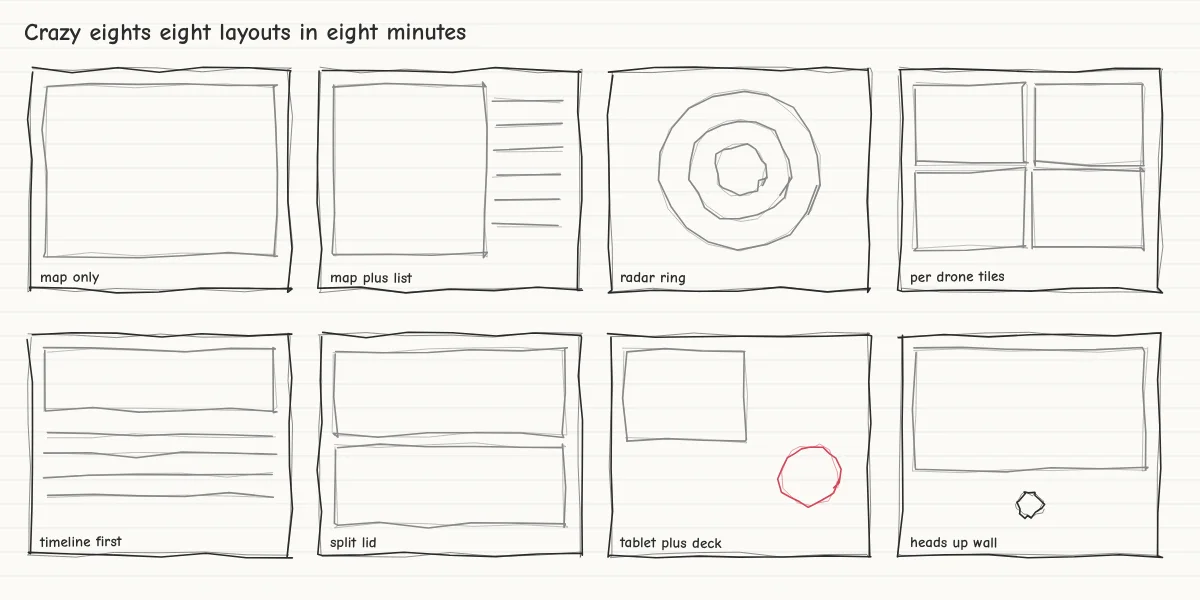
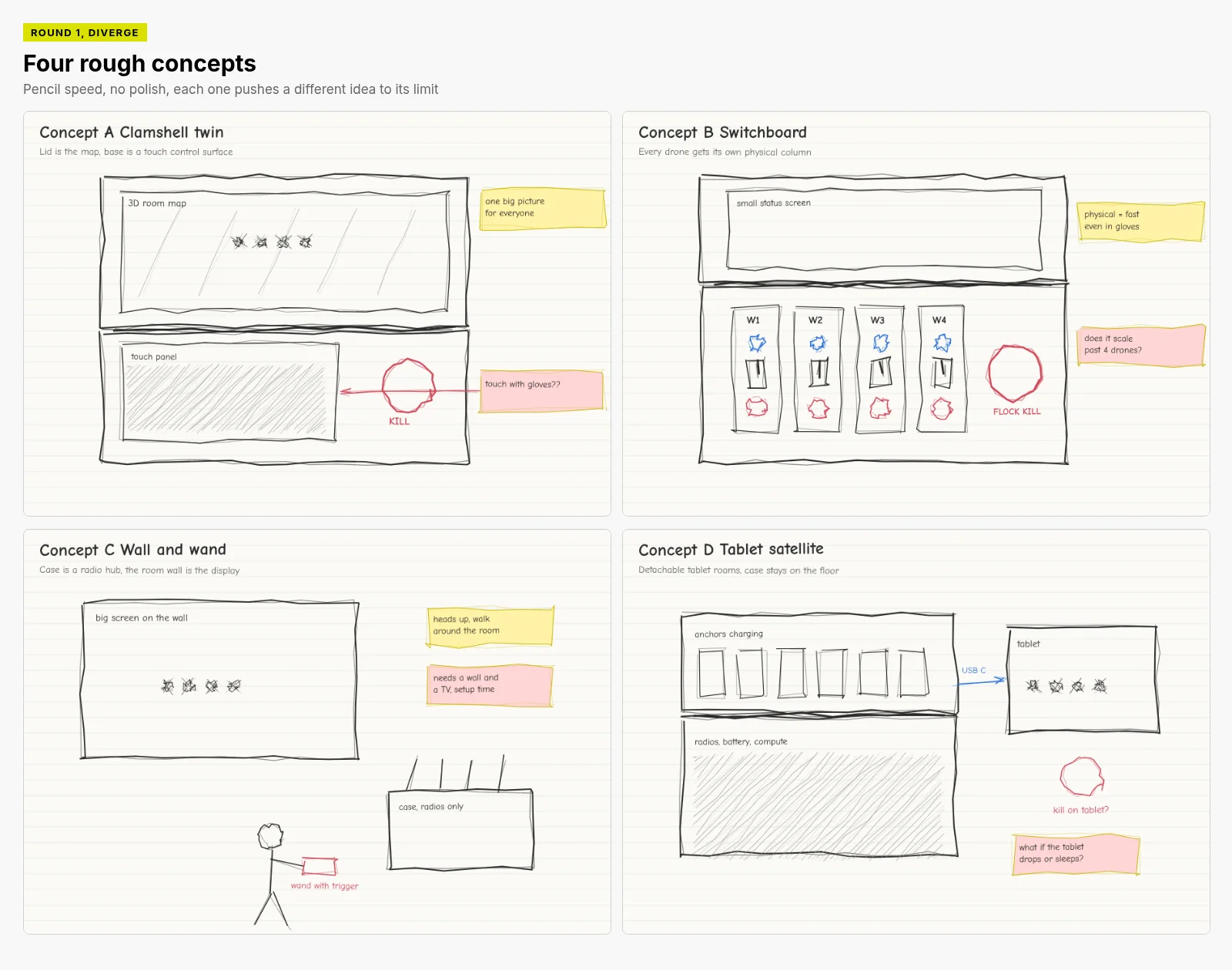
We started deliberately rough and deliberately wide. A Crazy 8s sheet gave us eight layouts in eight minutes. Then we picked four provocations and pushed each one to an extreme, because an extreme idea fails in a way that teaches you something.
Crazy 8s. Eight layouts in eight minutes, from map only to a heads up wall. Speed was the point, so nobody got attached.Four provocations compared. Each asked a different question about the same problem.
05 · Ideate widely
Four case concepts, and what each taught us
Round 1. Four physical concepts sketched at pencil speed, with sticky note critiques.
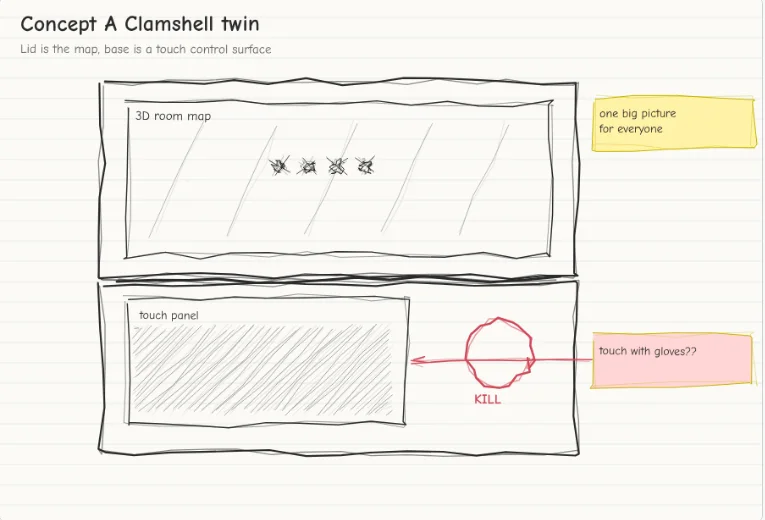
A, clamshell twinThe useful idea here wasn't the layout, it was one large shared picture in the lid that everyone near the case could read. We rejected its touchscreen safety panel straight away.
B, switchboardThis concept helped us discover that physical controls are fast and work in gloves. A column per drone does not scale, so we kept the physical idea and dropped the columns.
C, wall and wandHeads up and mobile, but it needs a wall and a television, and the stop leaves the case. We parked it.
D, tablet satelliteWe rejected this direction because a detachable screen that sleeps or gets dropped would take the stop with it. Its charging bay for beacons survived.
The stop must never depend on a screen, a sleep timer or a battery that isn't the case's own.
06 · Prototype to answer questions
Every prototype had a question
We did not prototype to make things look finished. Each sketch, wireframe and software mock up existed to answer a specific design hypothesis. Being honest about which questions we have answered, and how, matters as much as the answers.
Hypothesis
What we actually did
What we propose next
H1
An operator can read the state of the flock without reading four status panels
Cognitive walkthrough of each sketch round against the readiness test DONE BY DESIGN TEAM
Timed glance tests with real operators in a simulator PROPOSED
H2
The stop is found without searching, even in gloves
Scenario walkthrough of the hardest moment with paper and software prototypes DONE BY DESIGN TEAM
Foam case mock up, first time users in gloves, eyes on the room PROPOSED
H3
A growing halo is read as less certain, not as a bigger or closer drone
Heuristic evaluation by the design team DONE BY DESIGN TEAM
Comprehension test with people new to the system PROPOSED
H4
One drone can be taken over while the others carry on, without confusion about who flies what
Cognitive walkthrough of the take over flow DONE BY DESIGN TEAM
Simulator trials with injected faults PROPOSED
H5
Landing one at a time is quick enough when a person is close
Not yet tested NOT DONE
Simulator timing runs, then a supervised trial PROPOSED
Methods we used
Scenario walkthroughsThe design team stepped through five scenarios, including the hardest moment, using each round of sketches.
Heuristic evaluationWe reviewed each round against established usability heuristics and our six principles.
Cognitive walkthroughFor each sketch we asked whether the seven readiness questions could be answered, and how quickly.
An honest limit
All of the observations in this study come from the design team walking through its own prototypes. That is useful for catching obvious problems, but it cannot tell us how a real operator under pressure will behave. The tests marked proposed are the next step, not something we have done.
07 · Show the iteration
What changed, and why
The observations below come from design team walkthroughs of our own prototypes, not from user testing.
The stop leaves the screen
BEFORE
Round 1, the stop sits beside a touch panel
AFTER
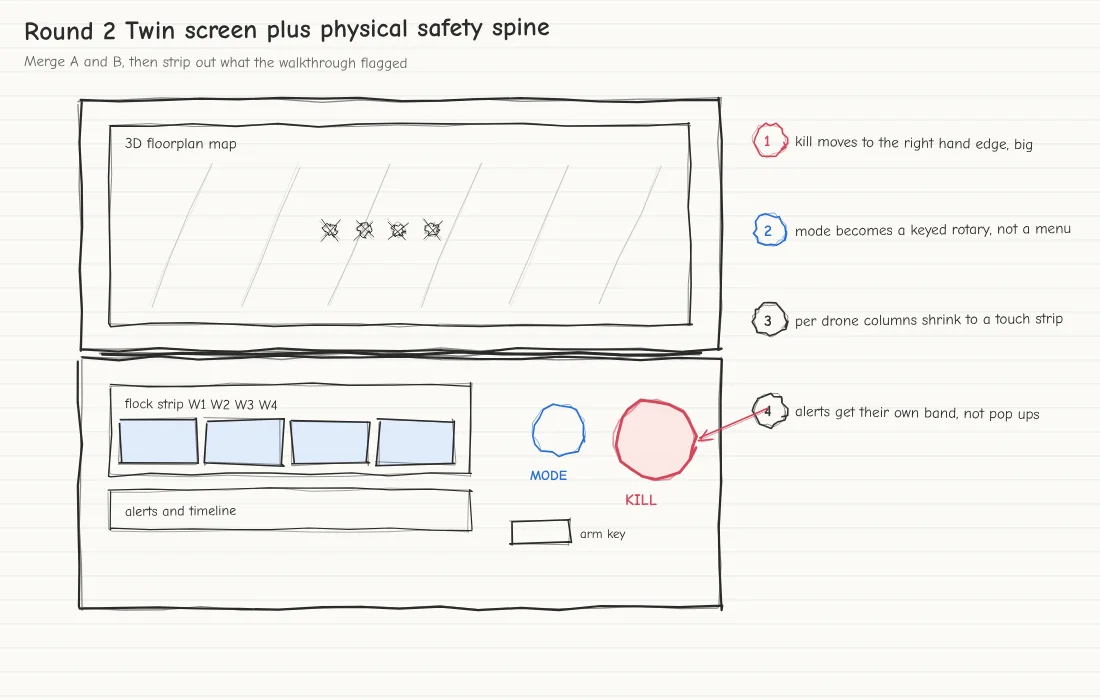
Round 2, a big physical stop on the right edge
What we observedWalking the hardest moment with concept A, we kept reaching for a panel that might be asleep or covered by a hand.
What we learnedThe stop has to be found by hand, with no dependency on software.
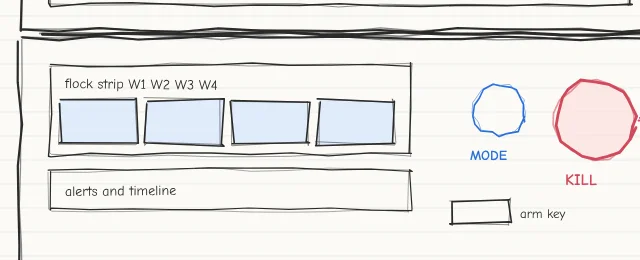
What we changedA physical safety spine, with the stop at the right hand edge, mode on a keyed dial and an arm key.
Who is in control, always
BEFORE
Round 2, mode lives on a dial only
AFTER
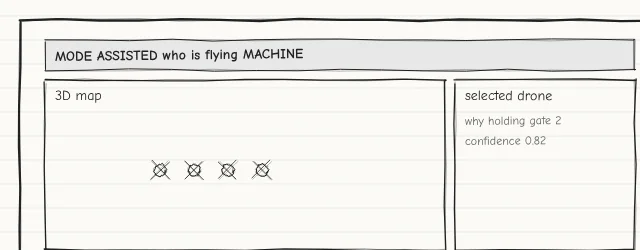
Round 3, mode and who is flying across the top
What we observedAfter a simulated take over we could not tell from the sketch who was now flying that drone.
What we learnedMode errors are quiet. The state has to be stated, not inferred.
What we changedA mode banner and a who is in control panel, in words, always on screen.
07 · Show the iteration
What changed, and why, continued
Alerts that wait their turn
BEFORE
Round 2, alerts share a strip with the timeline
AFTER
Final, one alert band with a deadline and an action
What we observedIn the low battery scenario, pop ups covered the map at the moment the operator needed it.
What we learnedAlerts compete with the picture. Most do not need the human.
What we changedOne band showing only the top priority alert, with what to do and by when. Everything else goes to a log.
A number became a picture
BEFORE
Round 3, confidence shown as a number
AFTER
Final, a halo that grows with doubt
What we observedIn walkthroughs we noticed nobody looked at a number in a side panel while watching the map.
What we learnedUncertainty has to live where the eye already is, on the map itself.
What we changedA shaded halo under each drone that grows as the system becomes less sure, backed up by plain words.
07 · Show the iteration
The biggest change, how the flock stops
From drop to hold and land
BEFORE
Round 2, a single kill that cuts every motor
AFTER
Round 3, hold and land first, a guarded kill beside it
What we observedWalking the hardest moment again, a kill meant four drones falling near the person who had just walked in.
What we learnedStopping the motors moves the risk rather than removing it. A controlled stop protects people better.
What we changedThe big stop now holds every drone and lands them one at a time on clear pads. A separate kill sits under a cover as a last resort.
NeedStop the flock without creating a new hazard
ExplorationDrop everything, hold in place, return to launch, hold then land
LearningHolding alone leaves drones over the person. Return to launch crosses the room. Landing nearby on clear pads keeps everything predictable
DecisionHold and land as the primary stop, with a guarded kill that still drops everything when it truly must
08 · The final design
The case
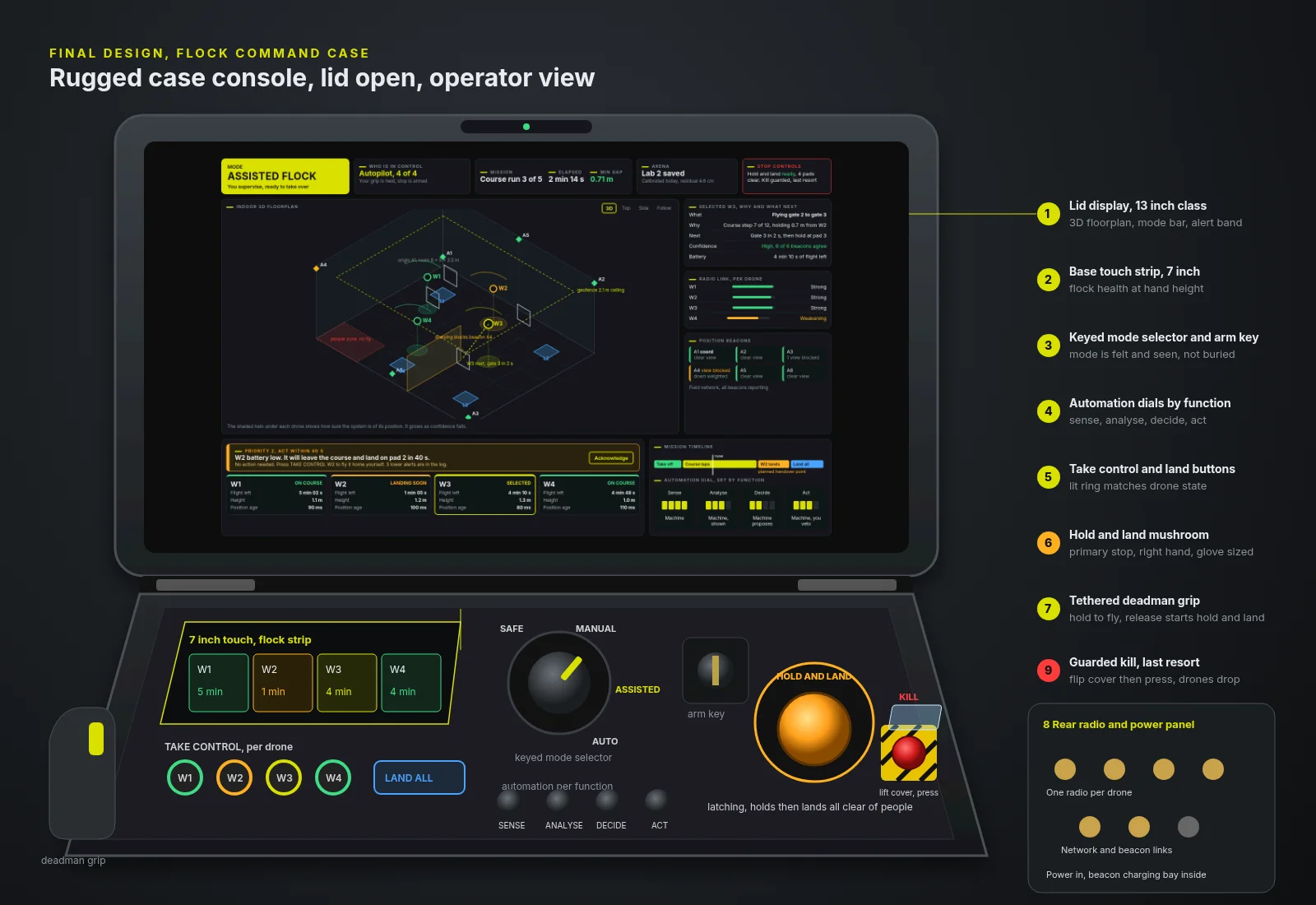
The final design is a rugged case with two surfaces. The lid carries one large shared picture. The base carries the controls that must work by touch. Placement follows a simple rule, the more urgent an action, the bigger, more physical and more right handed it is.
Final case. The lid screen shows the situation, the base carries the hands. Hold and land is the largest control on the case, and the kill hides under a cover beside it.
08 · The final design
At a glance
1
2
3
4
5
6
7
8
9
10
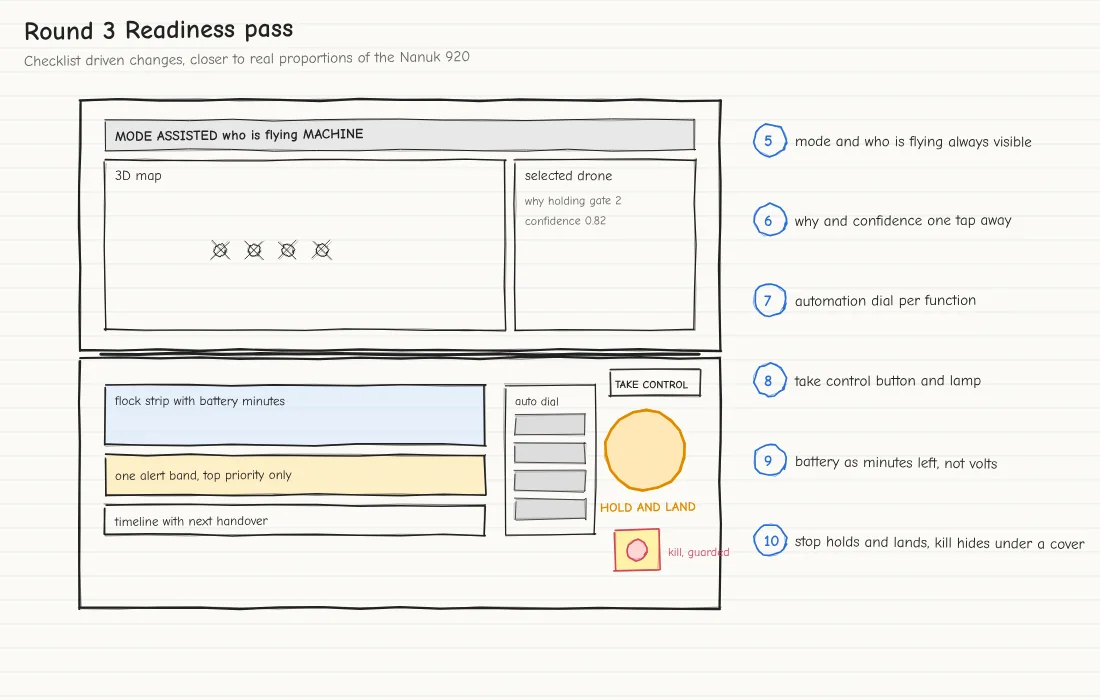
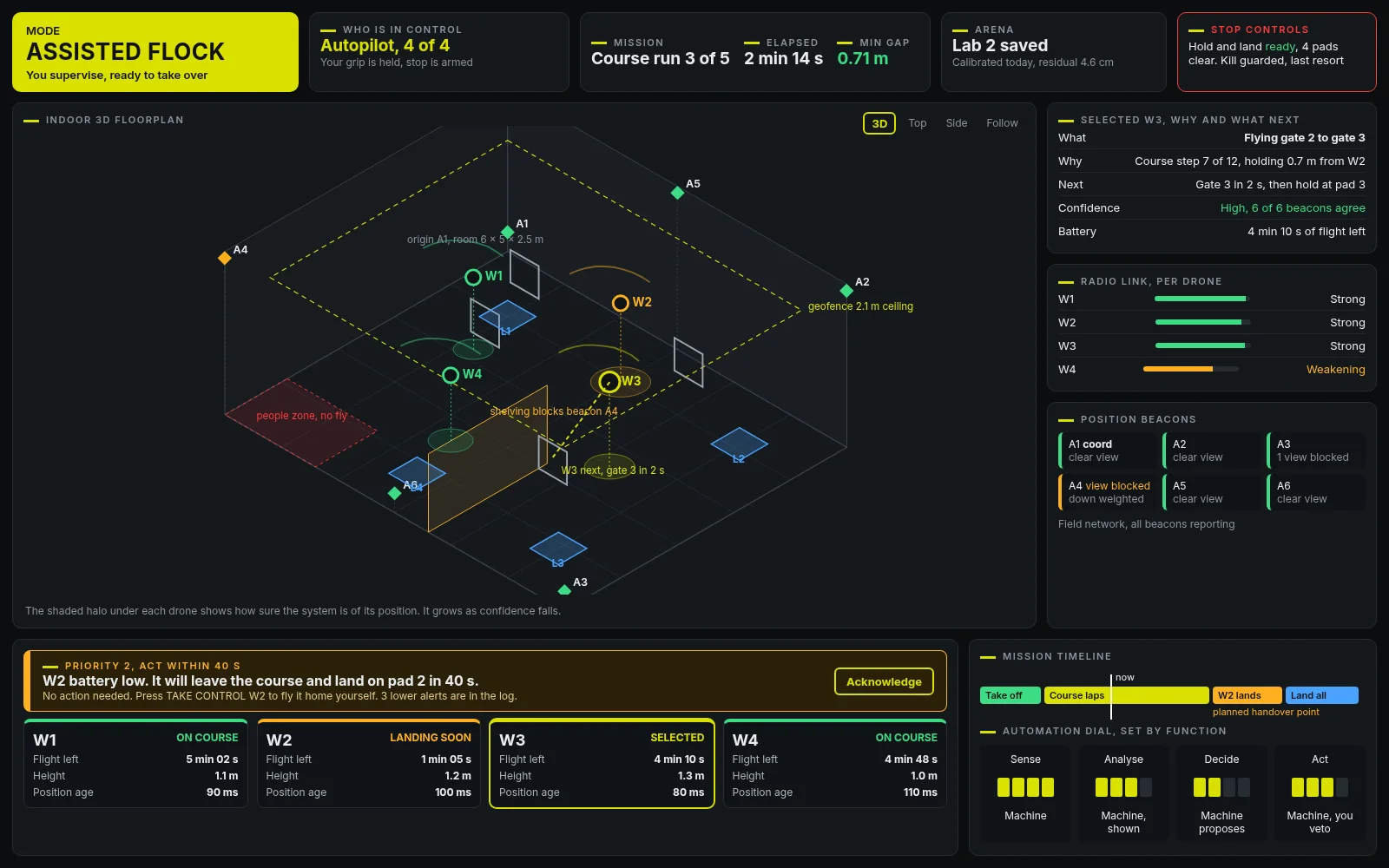
1Mode, in words and colour, readable across the room
2Who is in control, stated plainly
3Stop controls, always visible, showing what is ready
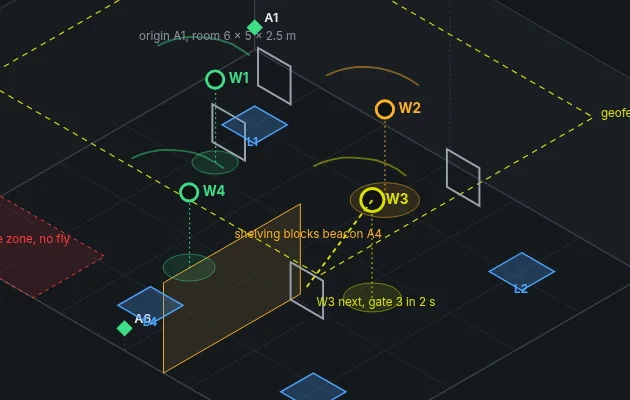
4Map with a halo under each drone that grows with doubt
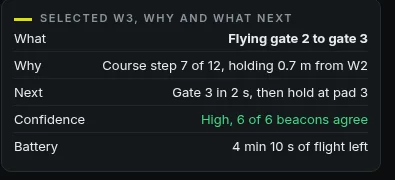
5Why and what next, for the selected drone only
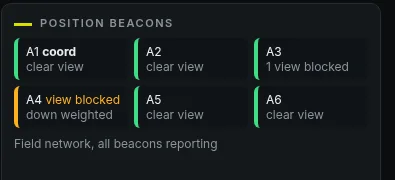
6Position beacons, with any blocked view flagged
7One alert band, top priority only, with a deadline
8A card per drone, minutes left, not volts
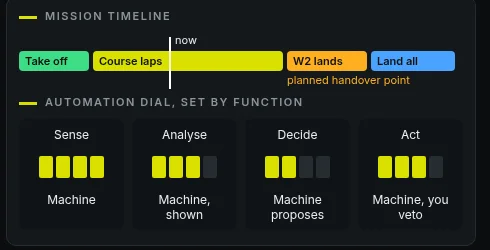
9Mission timeline with the next planned handover
10Automation dial, showing what the machine decides
The information hierarchy reads top to bottom and big to small. The top band answers the first question anyone asks, what is going on and who is in charge. The map takes the most space because spatial awareness is the hardest thing to rebuild after looking away. Detail sits to the right, where it can be ignored until wanted. Everything that might need a decision sits along the bottom, close to the hands.
08 · The final design
When something changes, and when more detail is needed
When something changes
How doubt about a drone's position escalates. Each step is a little louder than the last, so the operator notices the picture becoming less trustworthy before it becomes a problem.
Most interfaces have two states, fine and alarm. We designed for the slope between them. The halo is a gentle, continuous hint that costs no attention when it is small. If doubt keeps growing the drone's card turns amber and the blocked beacon is flagged, so the cause is visible as well as the effect. Only when the drone genuinely cannot trust itself does it act on its own and say so.
The halo lives on the map, where the eye already is.
The cause, a beacon with a blocked view, is one glance to the right.
When more detail is needed
Selecting a drone opens a short panel that answers what it is doing, why, what it will do next and how sure it is. This is progressive disclosure. The explanation is there in one tap when the operator wants it, and absent when they do not, so it never competes with the map. Plain sentences replace codes, so the operator can recognise rather than recall.
08 · The final design
When the human needs to intervene
The alert band and the drone cards sit directly above the take control buttons on the case.
When the software wants a decision it says so in one place, with a priority, a deadline and the option the human has. In the example, a drone with low battery will leave the course and land in forty seconds. No action is needed, but the operator can take it home themselves. That framing matters. It tells the operator the machine has a plan, so they are choosing whether to intervene rather than scrambling to.
Taking over is one press on a lit ring button that matches the drone's colour on screen, so the mapping between hand and picture is direct. The others keep flying. After every switch, the who is in control panel confirms the new arrangement in words, so feedback closes the loop.
The automation dial shows, function by function, how much the machine decides. It keeps responsibility visible rather than implied.
NeedStep in for one drone without disturbing the rest
ExplorationTake over the whole flock, a menu per drone, a physical button per drone
LearningWhole flock take over punished the three drones doing fine. Menus were too slow in gloves
DecisionA lit button per drone, matched by colour, with words on screen confirming who flies
08 · The final design
When something goes wrong
Things go wrong in degrees, so the design responds in degrees. The same four states appear on screen and on the case, so the operator never has to reconcile two different stories.
Interaction states. Normal, degraded, hold and land, and kill. Colour is reserved and consistent, lime for normal, amber for attention, red only for the last resort.
Hold and safe land
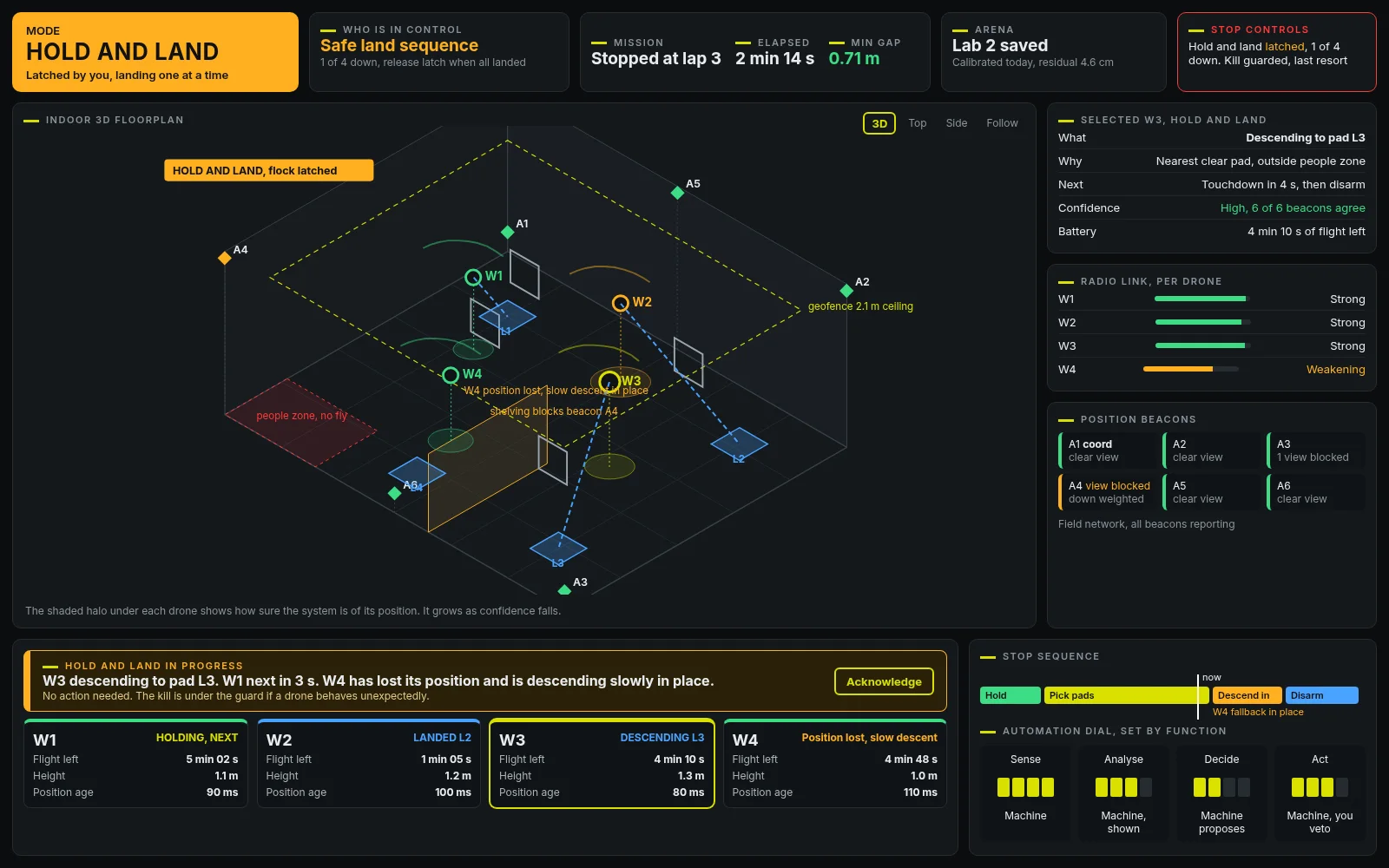
Pressing the big amber control latches the whole flock into hold and land. Every drone stops where it is. Each one is given its own clear landing pad away from people, and they come down one at a time, so nothing collides on the way. If a drone is not sure where it is, it does not guess, it descends slowly on the spot and is flagged. If a drone loses its radio link, it lands itself rather than falling.
How the stop behaves. The main path, the two fallbacks and the guarded kill.
08 · The final design
What the operator sees during hold and land
During hold and land the whole screen agrees. The mode turns amber, the map draws each drone's path to its pad, the cards count down and the timeline becomes a stop sequence.
Why amber, not red
Red would say emergency. Hold and land is the system doing the safe thing on purpose. Amber says attention, things are under control, keep watching.
Why the kill hides
A kill drops every drone. That can be right, for example if a drone is behaving dangerously, but it should never be pressed by accident. A flip cover adds one deliberate step, and the red on yellow stripes make it unmistakable once uncovered.
Safety should have an obvious physical affordance. The most important control is the biggest, the most distinctive and always in the same place.
09 · Connect decisions to needs
User need to design response
Every element in the final design exists because of a need. If we could not point to one, it did not make the cut.
User need
Design response
N1 Stop safely in one obvious action
Large amber latching hold and land control, clear pads, landing in turn, guarded kill under a flip cover
N2 Notice when the picture is less trustworthy
A halo that grows with doubt, amber cards, flagged beacons, plain words in the detail panel
N3 Never wonder who is in control
Mode banner in words, who is in control panel, keyed mode dial on the case
N4 Understand the group at a glance
Drone cards with one status word each, a single flock gap number, colour only on exceptions
N5 Find out why, only when asked
One tap detail panel with what, why, next and how sure
N6 Take back one drone
A lit take control button per drone, colour matched to the screen, confirmation in words
N7 Only what needs attention
One alert band with priority, deadline and the human option, the rest in a log
N8 How long each can fly
Minutes left on every card, planned landings on the mission timeline
N9 A new room is safe
Guided beacon placement and a clear go or no go before take off is allowed
N10 Operate while busy
Hand sized physical controls, a deadman grip, big touch targets, glance first layout
Against the principles
Principle
Where it shows up
Make uncertainty visible
Halo, amber escalation, beacon flags
Design for the moment of intervention
Hold and land placement, take control buttons, alert deadlines
Show the mission before the machinery
Mode, mission and minutes up front, radio and beacon detail secondary
Obvious physical affordance for safety
Amber mushroom, guarded kill, keyed mode dial
Exceptions deserve attention
Calm default, one alert band, colour reserved
Always say who is in control
Who is in control panel, confirmation after every switch
Appendix
Technical traceability, in brief
For readers who want to connect the design back to the engineering. The full technical requirements and their sources are in the earlier design paper for this project.
Need
Engineering requirement
Why it matters to the experience
N1
Two tier stop, hold and land first, guarded kill last
Hold and land relies on each drone's flight software landing rather than dropping when its link is lost. The kill therefore disarms each drone over its link before cutting radio power, so it still works as a true drop.
N2
Position confidence always visible
Indoor positioning uses radio beacons, which lose accuracy when walls, shelves or people block their view.
N3
Unmistakable mode and control
Mode is set by a keyed dial, mirrored on screen.
N4
Group supervision with drill down
Flock state is summarised, detail on selection.
N6
Rehearsed handover per drone
Each drone has its own radio, so one can be taken over alone.
N7
Few, prioritised alerts
A weakening radio link is warned about before the drone acts on its own.
N8
Battery as minutes
Flights last roughly ten minutes.
N9
Fast set up
Beacons, chargers, radios and computer travel in the case, and the room is checked before arming.
N10
Glove ready controls
Safety, mode and take over live in hardware.
10 · Reflect
What we take away
What surprised us
How little of the hard work was about drones. The difficult questions were about attention, trust and responsibility, and they would look familiar to anyone who has designed for a control room or a hospital ward.
The assumption that changed
We began believing the stop should cut power, because that is what emergency stops usually do. Walking through the hardest moment showed that dropping four drones near a person just moves the risk. Hold and land became the primary stop, and the kill became the exception.
The early idea that survived
The single shared picture in the lid, from the very first clamshell sketch. Everything else changed around it.
What sketching revealed
Rough sketches made us talk about behaviour rather than style. Nobody argued about colours on a pencil drawing. They argued about where a hand would go.
What remains unresolved
Whether a growing halo is read as doubt by people new to it
How quickly landing in turn completes in a crowded room
How the design scales from four drones to eight
Whether a first time spotter in gloves finds the stop without being shown
What we would test next
A foam mock up of the case with gloved first time users
Simulator sessions with injected faults and timed responses
Usability tests with real operators running a short course
At the beginning we were designing a ground station that showed four drones. By the end we were designing an interface that helped one person understand when four autonomous machines needed them.
The next design question
If the flock grows to eight or twelve, attention will not grow with it. How do we help one person stay oriented when there are more machines than they can count at a glance?
What comes in Part 2
We will return to this project once the initial CAD design of the case is in and after the upcoming round of user feedback, which will be the first time real operators see the design. Part 2 will show what changed as a result.
Niki Shu Designs, design case study, Part 1, October 2026.

 Download the PDF (2.8 MB)