
We Don’t Want Another Dashboard
The brief arrived as a list. “We need a dashboard showing the fleet, system health, alerts, battery status, mission progress, communications, sensor confidence and live video.” Every item on it was reasonable. Every item was something the system could genuinely provide. And yet the most useful thing we did in the first week was ask a question nobody had put in the brief. Does the person standing in front of this screen actually need a dashboard, or do they need to know whether they should be doing something?
This piece is about that question. It is not an argument against dashboards as a visual style, and it is not an argument for minimalism. It is an argument for designing operational interfaces around decisions and attention rather than around the data a system happens to produce. The right information, at the right level of detail, at the right moment.
It is a companion to two earlier pieces. Designing Human‑Centric Interfaces for Autonomous Systems sets out the broader principles, and the Command Centre case study shows the physical and interaction design of a small operations room. This one goes underneath both, into information architecture, cognitive design and interaction hierarchy.
1. The brief
The scenario here is fictional but recognisable. A small fleet of autonomous vehicles, labelled W1 to W4, runs a survey mission. One operator supervises from a command station. The brief, as written, asks for a screen that shows everything the fleet knows about itself.
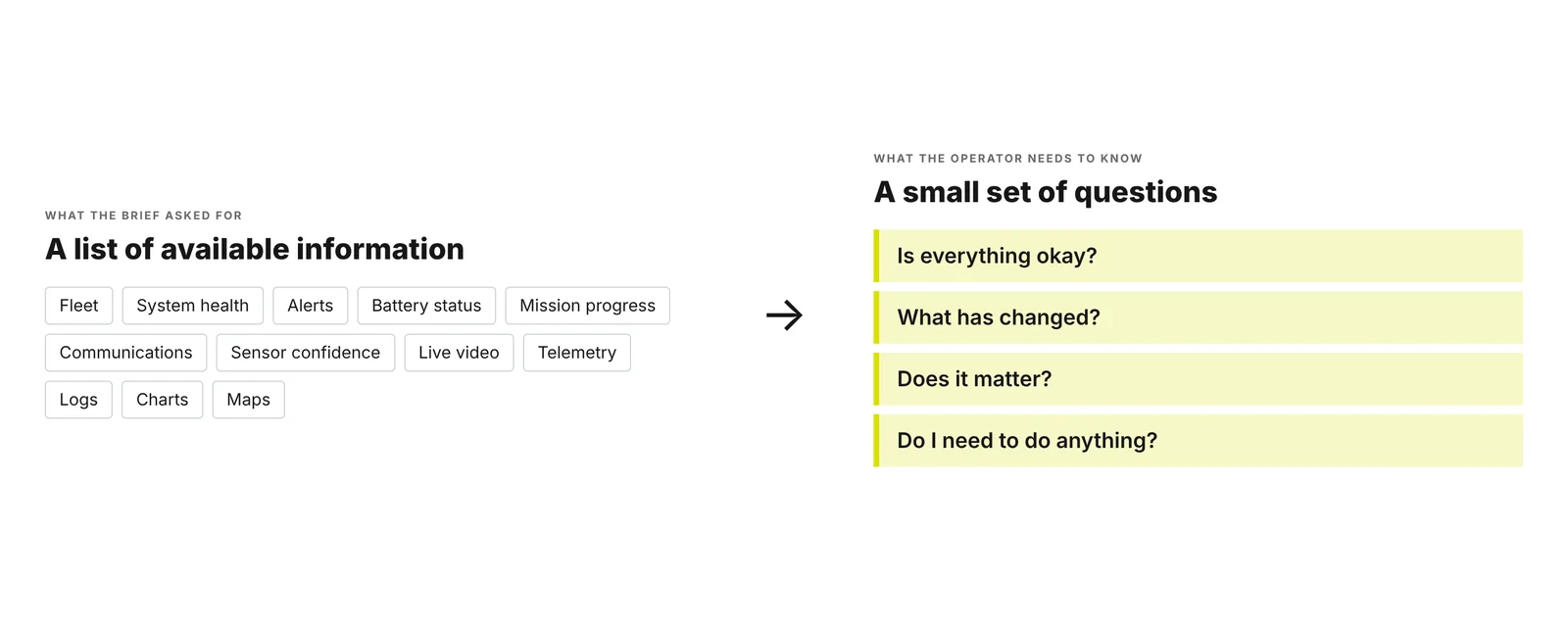
Most operational projects start this way. Someone lists the information available (status, metrics, events, alerts, maps, telemetry, charts, logs) and the design task becomes finding a place for each one. That is how you get a dashboard. Not through bad intent, but because the starting point is the system’s output rather than the person’s question.
When we asked what the operator actually needed to know, the list collapsed into four questions. Is everything okay? What has changed? Does it matter? Do I need to do anything? Those four questions became the reusable model behind the rest of the work.
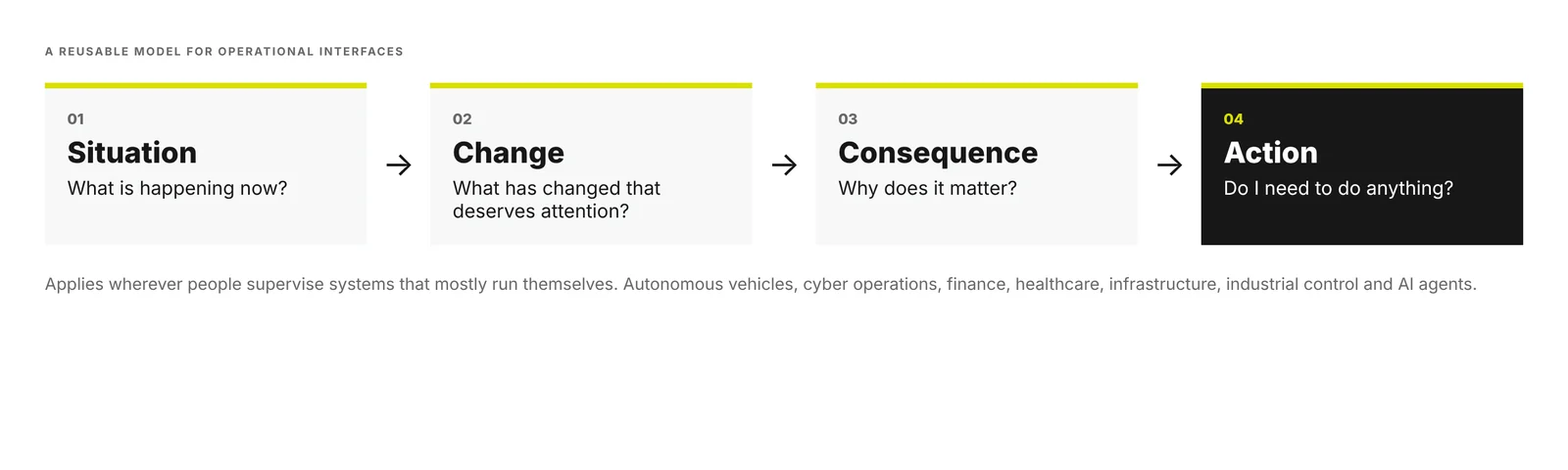
Situation is what is happening now. Change is what has changed that deserves attention. Consequence is why it matters. Action is whether I need to do anything, and what. We have since found the same shape useful wherever people supervise systems that mostly run themselves, from autonomous vehicles and cyber operations to finance, healthcare, infrastructure, industrial control and, increasingly, AI agents.
2. A credible first dashboard
Before arguing with the brief, we built it. Properly. We wanted a version that a competent product team would be proud of, because critiquing a straw man teaches nothing.
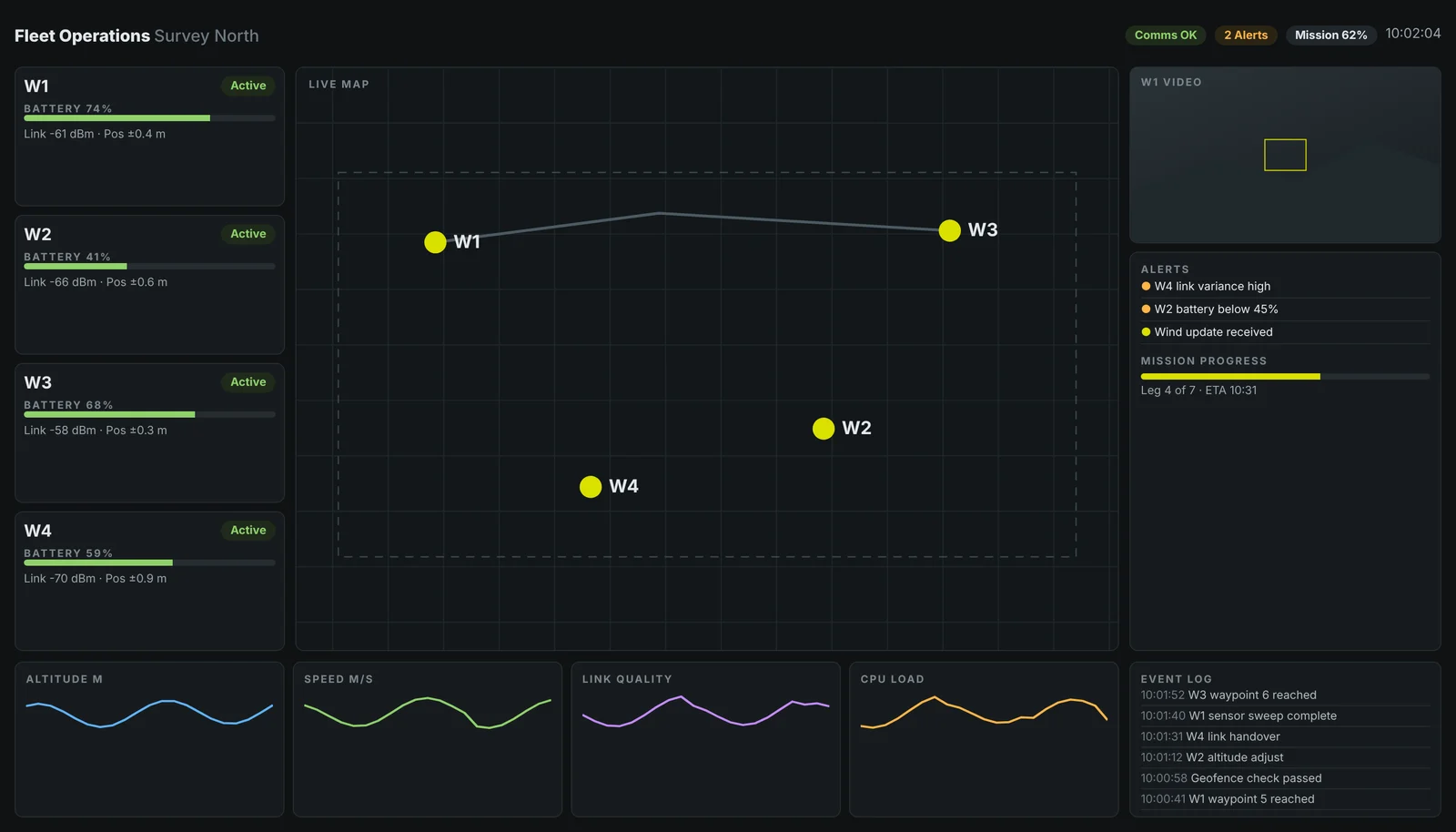
It looks good. It is well organised, consistent, legible. So what is wrong with it?
Nothing, individually. Every panel is accurate and every panel is defensible. The problem is the organising principle. The screen is arranged around categories of information, battery here, link quality there, events down the side, rather than around what the operator needs to do. To answer “is everything okay?” the operator has to visit nine places and assemble the answer in their head. W2’s battery at 41% is visible, but nothing says whether 41% is fine for the task it has left. The screen shows the system. It does not interpret it.
3. Understand the user before changing the UI
The temptation at this point is to redesign the layout. We resisted it, and went back to the context of use.
The operator stands at a command station while an autonomous system runs. Most of the time, everything is normal. Their attention is divided between the screen, the physical space, radio traffic and colleagues. Their real job is not monitoring numbers. It is supervision and exception management, knowing when to leave the system alone and when to step in.
We framed three jobs to be done. These are design constructs drawn from the scenario and from familiar patterns in supervisory work, not findings from interviews with operators.
- “When everything is operating normally, I need to know that I don’t need to intervene.”
- “When something changes, I need to understand whether it matters.”
- “When intervention is required, I need to know what I can do and what will happen next.”
Notice that the first job is about reassurance. A large part of good operational design is giving people permission to look away.
4. Map the operator’s decisions
Next we took each piece of information from the brief and asked which decision it actually served. This simple exercise did more to reshape the interface than any layout sketch.
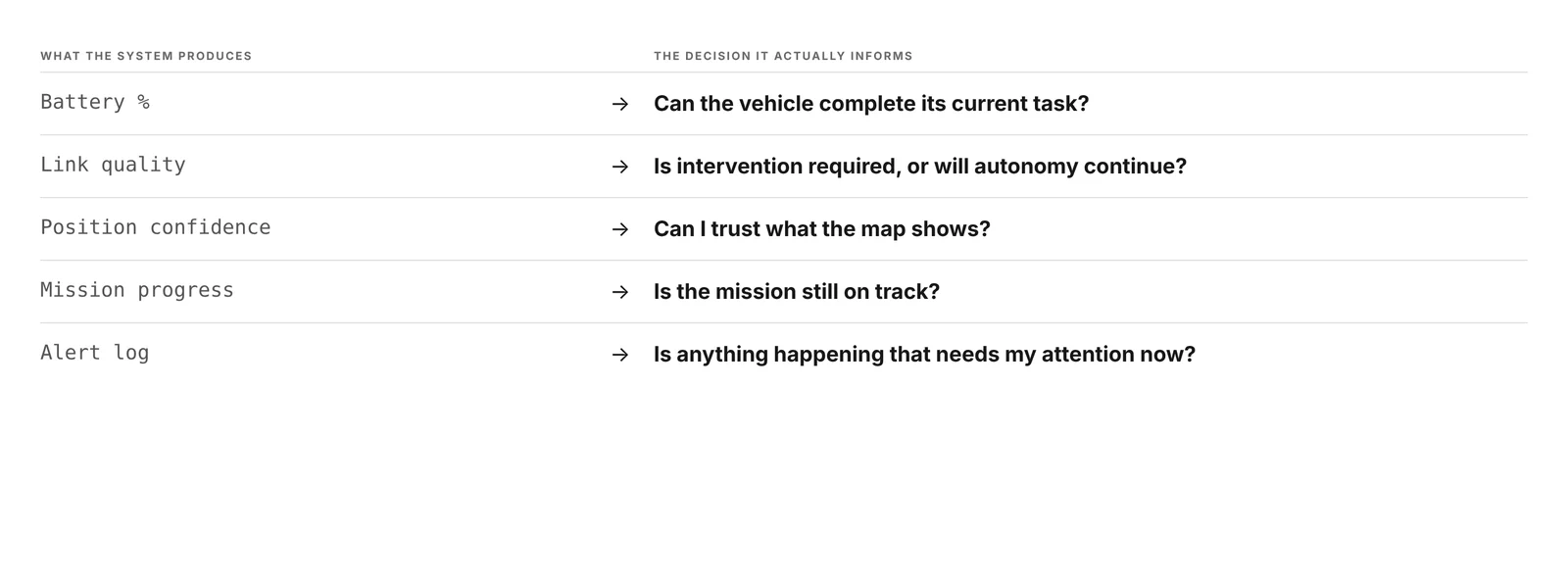
Battery percentage informs whether the vehicle can complete its current task. Link quality informs whether intervention is required or autonomy will continue. Position confidence tells the operator whether they can trust what the map shows. Mission progress says whether the mission is still on track. The alert log is really a proxy for one question, whether anything needs attention now.
5. Build the information hierarchy
With decisions mapped, we sorted every item into three groups on the wall. This is information architecture and progressive disclosure in its plainest form.
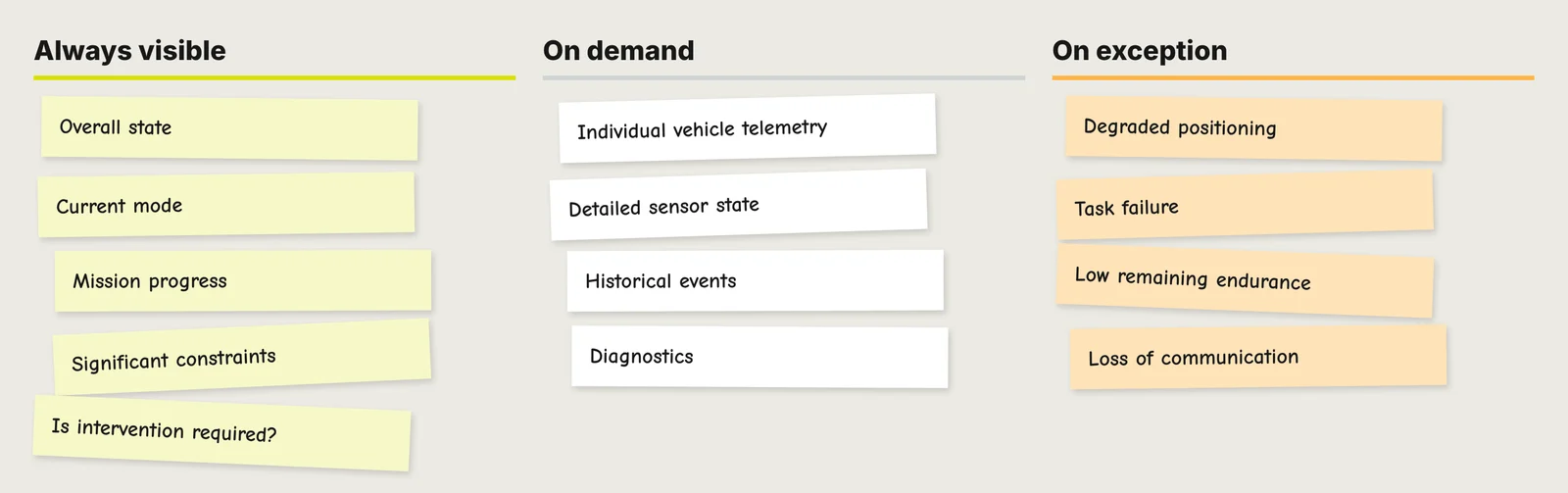
Always visible is the small set that answers “is everything okay?”, the overall state, current mode, mission progress, any significant constraint, and whether intervention is required. On demand is the rich detail that experts value but rarely need at a glance, individual vehicle telemetry, detailed sensor state, historical events and diagnostics. On exception is information that should stay out of the way until it matters, and then claim the hierarchy, degraded positioning, task failure, low remaining endurance and loss of communication.
Nothing was removed. Everything was given a time and a place.
6. Three divergent concepts
We then pushed in deliberately different directions, to explore the trade off rather than polish one answer.
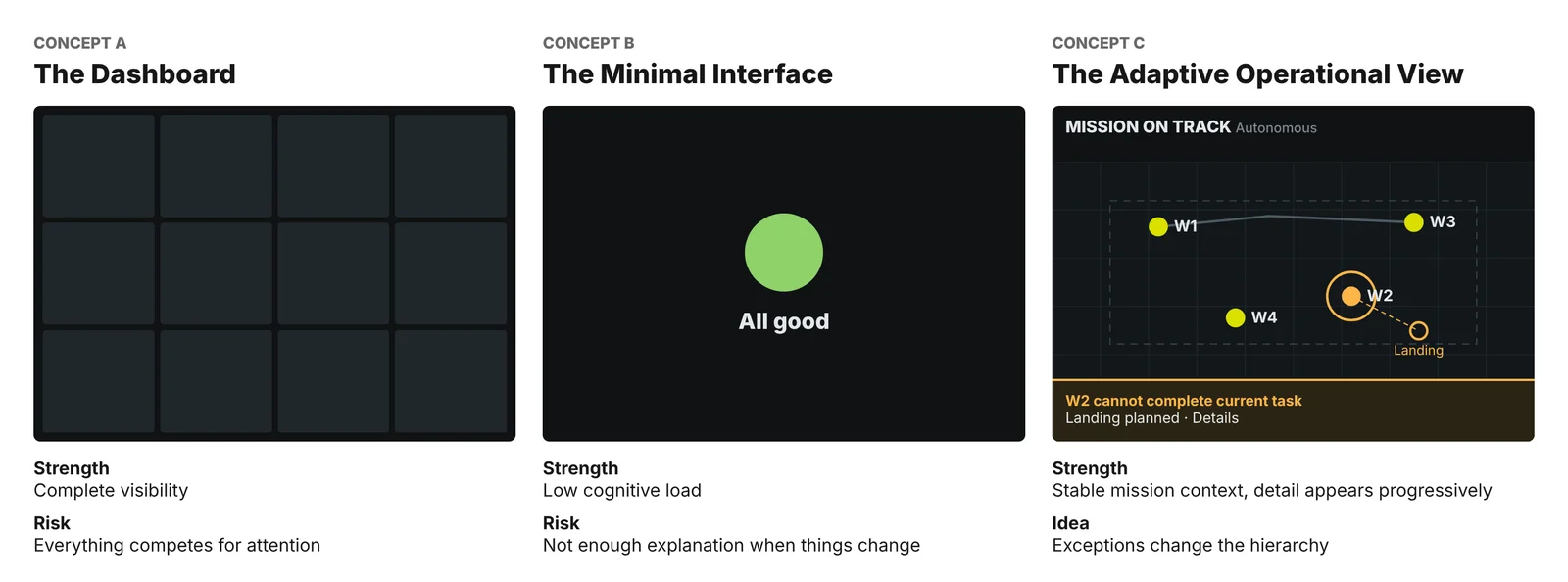
Concept A, The Dashboard, offers complete visibility. Its weakness is that everything competes for attention all the time, so the important thing and the unimportant thing look equally loud.
Concept B, The Minimal Interface, offers very low cognitive load. A single state, a single colour. It is lovely when nothing is happening and unhelpful the moment something does, because it gives the operator too little explanation to act on.
Concept C, The Adaptive Operational View, keeps a stable mission context on screen, lets detail appear progressively, and allows exceptions to change the hierarchy. The useful idea here was not the layout. It was that the same screen can be calm or urgent without being rearranged.
7. Test with scenarios, not aesthetics
We did not ask which concept looked cleaner. We walked each one through four scenarios, each tied to one of the jobs to be done.
- S1, nothing is wrong. Can the operator tell within two seconds that no action is required?
- S2, one vehicle is losing battery. Can they understand what will happen without opening a detail panel?
- S3, information becomes uncertain. Can they distinguish “nothing detected” from “we no longer know”?
- S4, intervention is required. Are the decision and the available actions obvious?
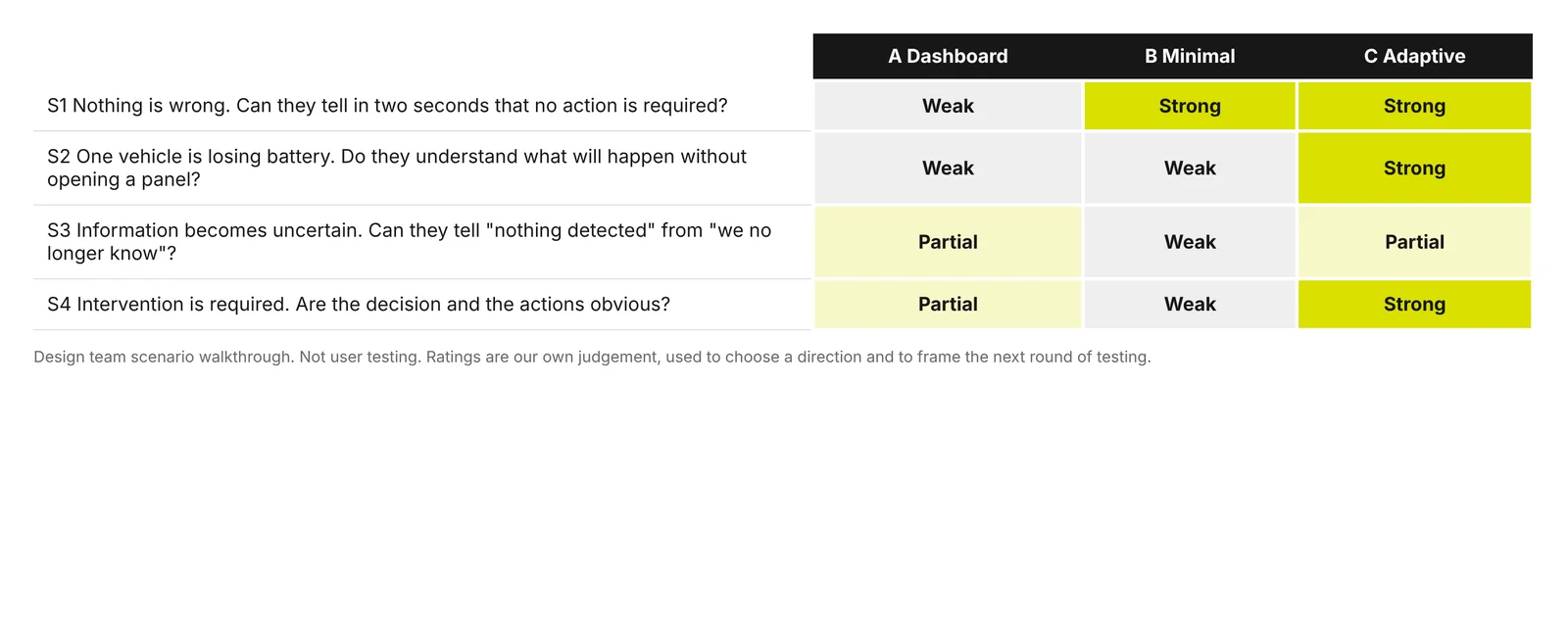
To be explicit, this was a design team scenario walkthrough, not testing with operators. The ratings are our own judgement. They were useful for choosing a direction and for framing what real testing should examine, but they are not evidence of performance. The dashboard did well when detail was needed and badly when calm was. The minimal view did well in S1 and failed everywhere else. The adaptive view was strongest overall, but S3 exposed a weakness we had not designed for.
8. The key refinement
The refinement that mattered was not less data. It was better management of attention, using the ordinary tools of interface design, hierarchy, progressive disclosure, salience, grouping, context, exception states, transitions, meaningful labels and clear affordances.
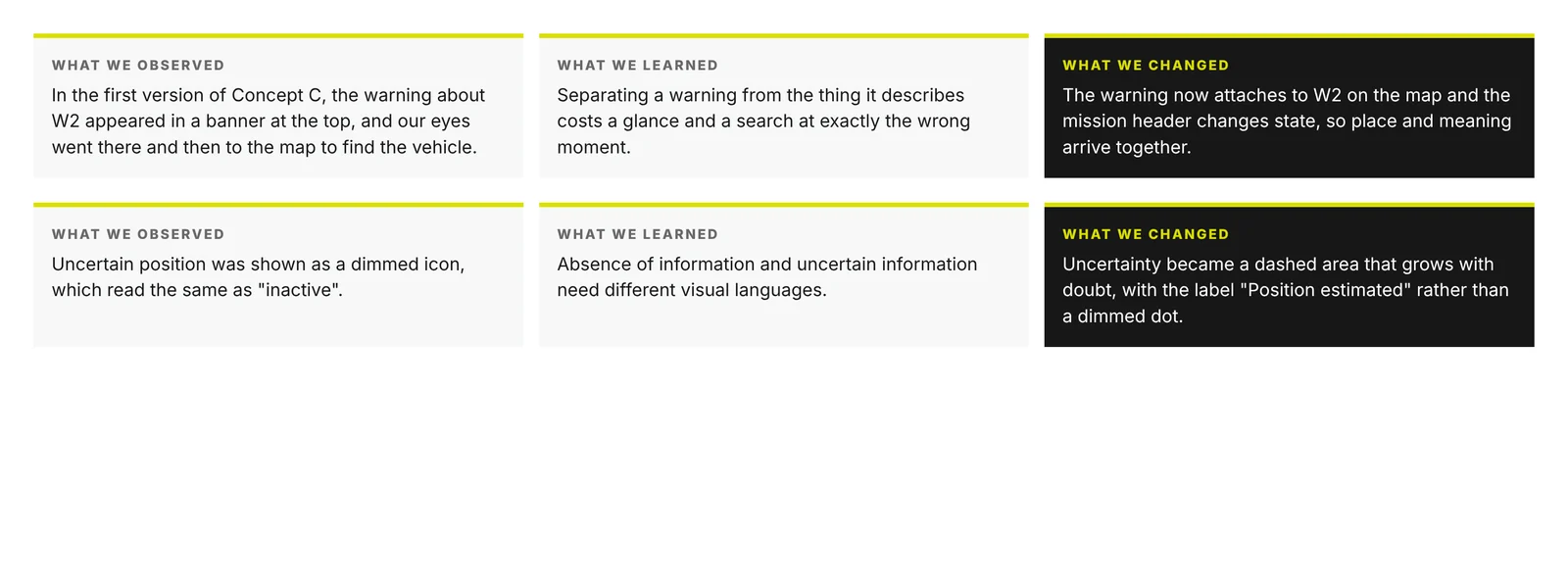
Two iterations show the pattern. In the first version of Concept C, a warning about W2 sat in a banner at the top, so our eyes went to the banner and then searched the map for the vehicle. Separating a warning from the thing it describes costs a glance and a search at exactly the wrong moment, so the warning now attaches to W2 on the map while the mission header changes state. In S3, uncertain position was shown as a dimmed icon, which read the same as inactive. Absence of information and uncertain information need different visual languages, so uncertainty became a dashed area that grows with doubt, labelled “Position estimated”.
9. Twelve seconds, four frames
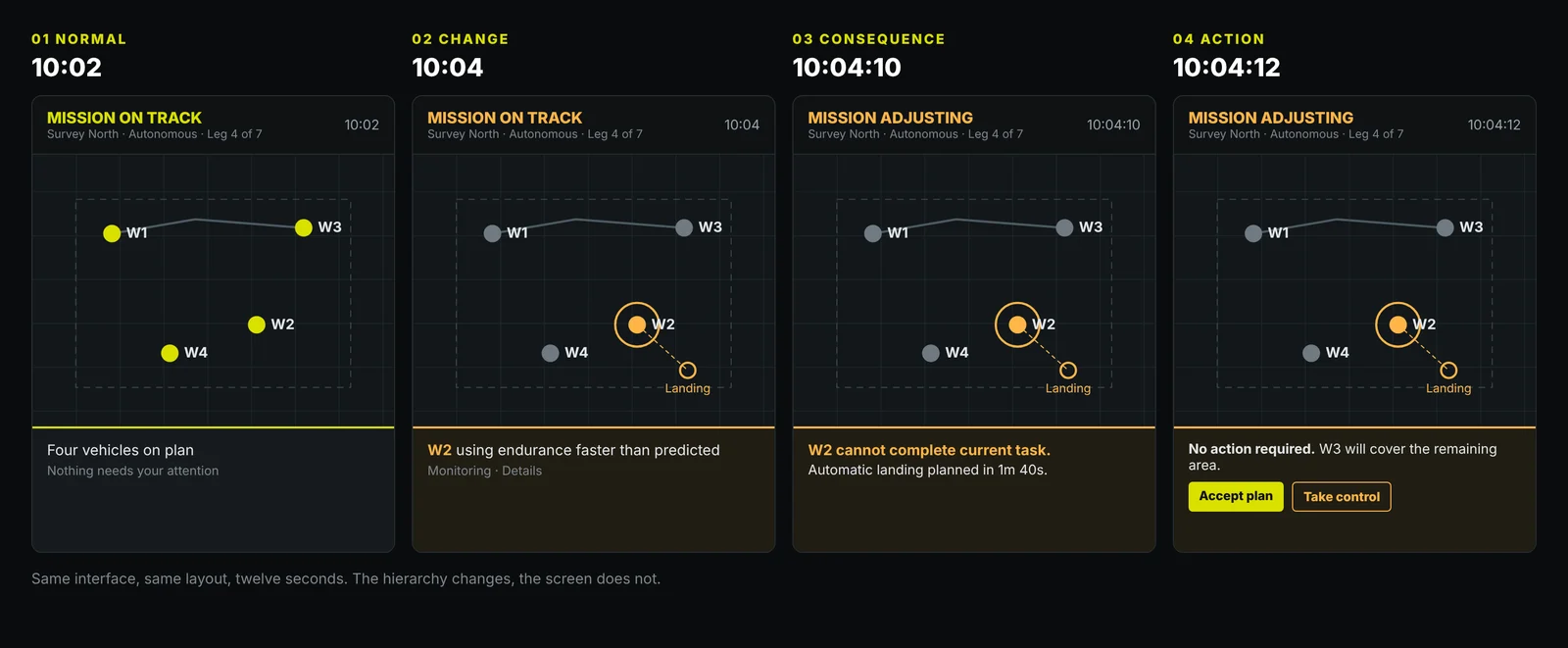
This is the heart of the design. The same interface, the same layout, across twelve seconds.
At 10:02, normal. The header reads MISSION ON TRACK. Nothing demands attention, and the interface is quiet enough to say so.
At 10:04, change. One vehicle is losing endurance faster than predicted. The interface changes subtly. W2 gains a ring, the other vehicles recede, and a single line of plain language appears. Nothing flashes.
At 10:04:10, consequence. “W2 cannot complete current task. Automatic landing planned in 1m 40s.” The operator no longer has to work out what a falling battery means. The interface has done that work.
At 10:04:12, action. The interface states whether a decision is needed. Here, no action is required because W3 will cover the remaining area, and the operator can accept the plan or take control. Both paths are visible and the default is explicit.
10. The final design
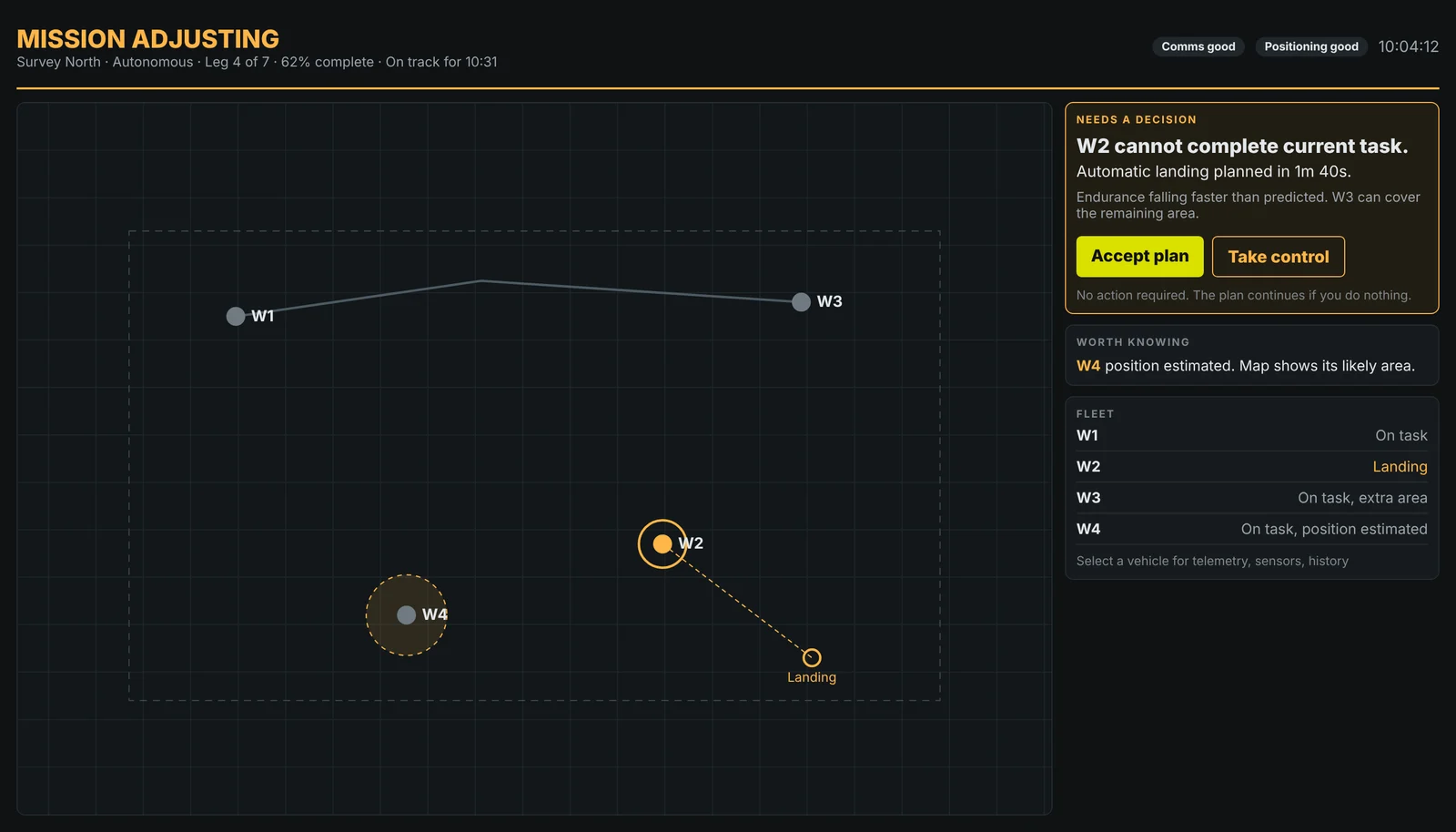
At a glance, the header carries the overall state, mode and mission progress, readable from a step back. When something changes, emphasis moves to the vehicle on the map and to a single decision card, while everything else is deliberately dimmed. When more detail is needed, selecting a vehicle opens telemetry, sensors and history, one step away rather than permanently on screen. When the human needs to intervene, the actions sit together with a clear primary choice and a plain statement of what happens if they do nothing. When information becomes uncertain, it is shown as uncertain, not as absent.
Five principles came out of the work, and they now serve as our test for any operational screen.
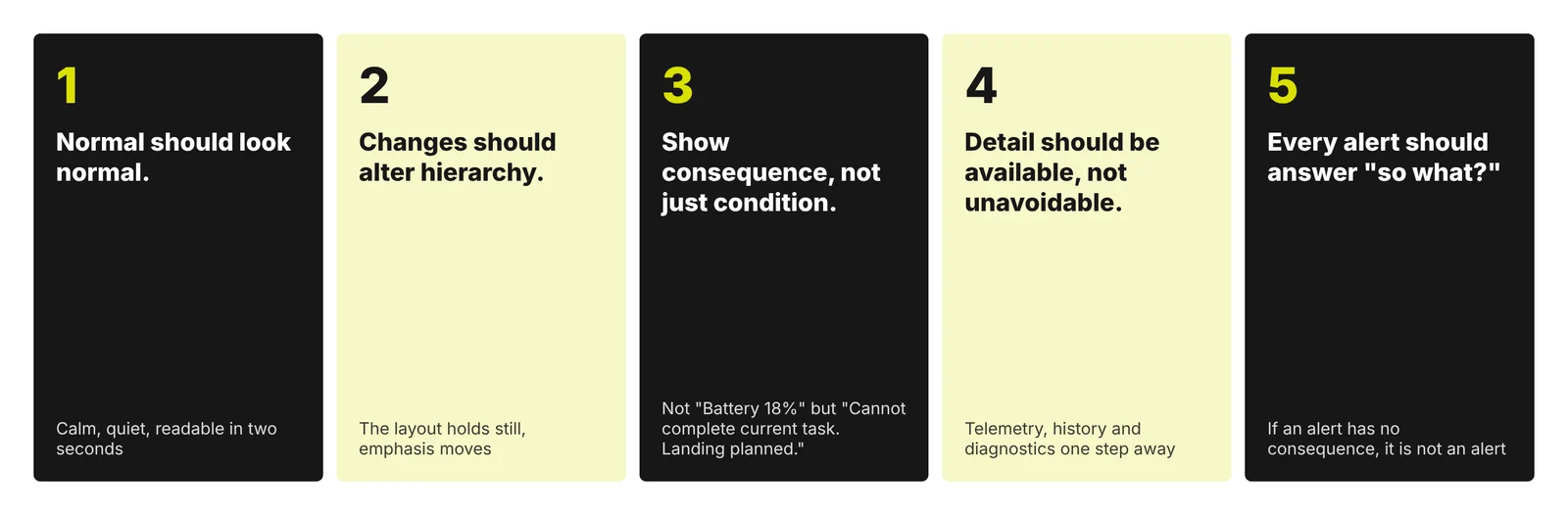
- Normal should look normal. Calm is information.
- Changes should alter hierarchy. The layout holds still and the emphasis moves.
- Show consequence, not just condition. Not “Battery 18%” but “Cannot complete current task. Landing planned.”
- Detail should be available, not unavoidable.
- Every alert should answer “so what?”
| User need | Design response |
|---|---|
| Know that I don’t need to intervene | A quiet normal state and a single overall status |
| Understand whether a change matters | Consequence written in plain language, attached to the vehicle |
| Trust what the map shows | Uncertainty drawn as a growing area, not a dimmed icon |
| Know what I can do and what happens next | One decision card, a primary action and an explicit default |
| Reach detail when I need it | Telemetry, sensors and history one step away |
11. Reflection
We started by assuming the interface needed to show the system. The design process changed that assumption. What the person actually needed was an interface that helped them understand when the system deserved their attention.
What surprised us was how much of the work happened before any layout changed. The decision mapping and the sticky note sort did most of the design. The credible dashboard survived in a sense too, because nearly all of its content still exists, simply placed where and when it is useful.
What remains unresolved is the boundary between consequence and recommendation. Writing “Landing planned” is interpretation the operator can check. Writing “No action required” is a judgement, and it asks for trust. Our next design question is how an interface should show the reasoning behind that judgement, quickly enough to be useful, so that operators can trust it when it is right and notice when it is not. That needs testing with real operators under realistic divided attention, which this walkthrough did not do.
Working on something similar? Tell us what you’re working on.
Niki Shu Designs